Shopify's 7x AI Traffic Surge: How to Calculate CAC When ChatGPT Sends You Customers
Track ChatGPT and AI referrals on Shopify with UTMs and GA4, build ShopifyQL dashboards, and calculate AI-specific CAC to compare against LTV:CAC benchmarks.
10 February 2026
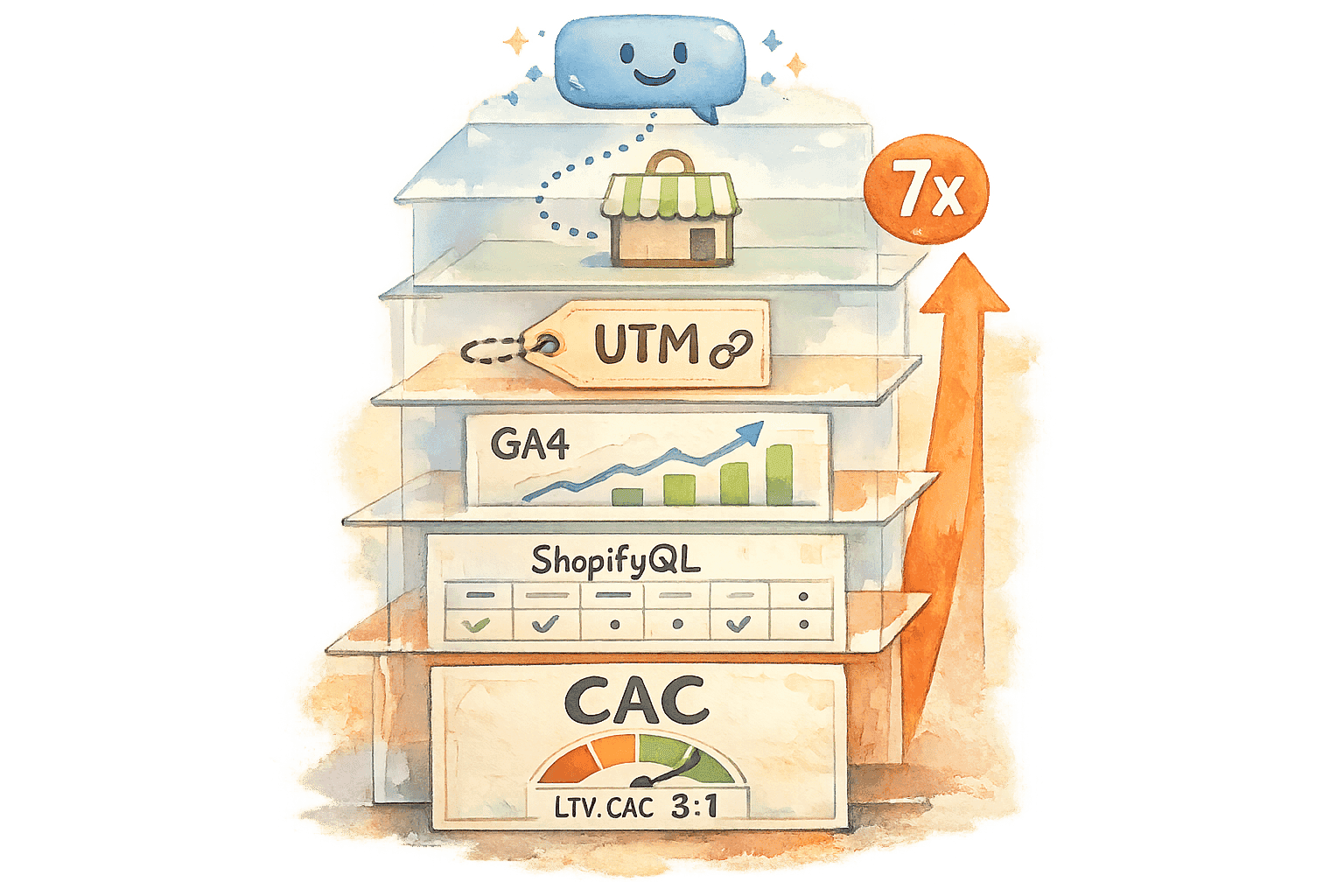
ChatGPT is now a major source of traffic for Australian Shopify stores, with AI-referred sessions growing by 1,200% year-on-year between January and September 2025. By September 2025, 88.5% of Australian businesses were leveraging AI-driven traffic, up from 13.5% in 2023. However, AI-sourced visitors convert at lower rates compared to organic search, with only 2.9% completing purchases, and their average order value (A$146.70) is slightly below organic search (A$160.65).
Tracking this traffic accurately is a challenge due to misclassification as "Direct" or "Referral" traffic. Using UTM parameters, regex filters, and custom analytics setups in Shopify and Google Analytics 4 (GA4) can help isolate AI-driven traffic. Once tracked, calculate Customer Acquisition Cost (CAC) with this formula:
CAC = (AI Marketing Spend + Shopify Fees) / Number of AI-Acquired Customers
For example, if AI marketing spend is A$2,450, Shopify fees are A$350, and 80 customers are acquired, the CAC is A$35 per customer. Ensure your LTV:CAC ratio is 3:1 or higher for profitability. Adjust for differences in AI customer behaviour, such as higher purchase intent and average order value, to refine your metrics. Use dashboards in ShopifyQL, GA4, and Looker Studio to monitor performance and optimise strategies.
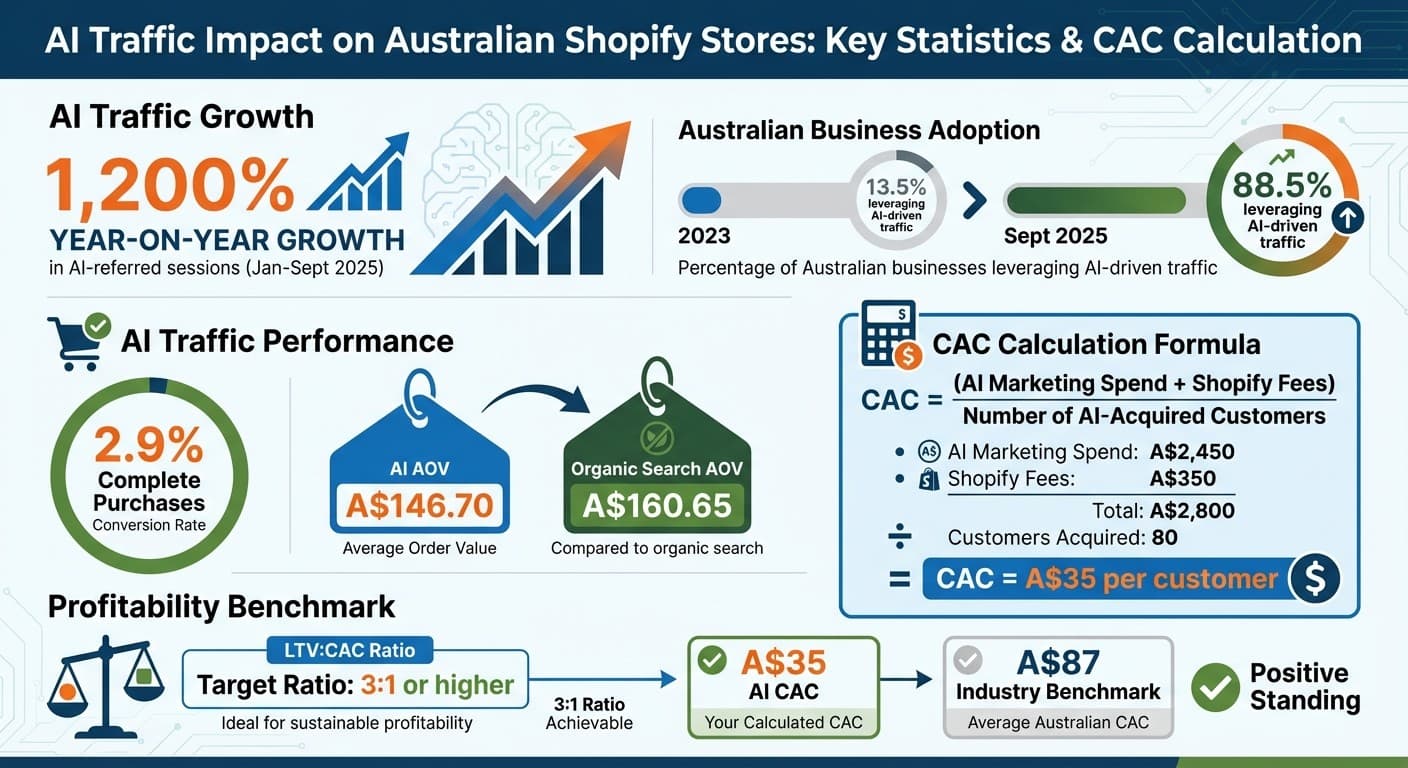
AI Traffic Impact on Australian Shopify Stores: Key Statistics and CAC Calculation
How to Create Cross-Channel Shopify Reports on Looker Studio (2026)

How to Track AI-Driven Traffic in Shopify
Tracking AI-driven traffic accurately is essential for calculating the true customer acquisition cost (CAC) of AI-sourced customers, which is a key focus here. One major hurdle is that around 60% of AI sessions lack referral headers. When users copy and paste ChatGPT links, the referral data is lost, and these visits often end up being misclassified as "Direct" traffic. This "dark traffic" creates challenges in accurately measuring CAC unless you have the right tracking tools in place.
To address this, you can use a combination of custom UTM parameters and regex filtering. These methods allow you to capture traffic from both seeded content (like product pages included in AI training data) and organic recommendations generated by ChatGPT. Together, they form the foundation for tracking AI-driven traffic and its impact on CAC.
Setting Up UTM Parameters for ChatGPT Referrals
UTM parameters are small tags added to URLs that override missing referral data, making it clear where your visitors come from. Since ChatGPT links often lose referrer headers, UTM parameters are critical.
To get started, use Google's Campaign URL Builder to format your URLs correctly. Focus on three key parameters: utm_source, utm_medium, and utm_campaign. For ChatGPT traffic, always use lowercase values, as GA4 treats "ChatGPT" and "chatgpt" as separate sources due to its case sensitivity.
"Using UTM parameters is one of the most effective ways to capture AI‑driven traffic."
- Pieter Verschueren, Co-founder, Rankshift AI
Here’s a recommended setup for Australian Shopify stores:
| UTM Parameter | Recommended Value | Purpose |
|---|---|---|
| utm_source | chatgpt | Identifies the AI platform |
| utm_medium | referral or ai | Categorises the traffic channel |
| utm_campaign | ai_referral_2026 | Tracks specific prompts or bots |
For example, your final URL might look like this:https://yourstore.com.au/product?utm_source=chatgpt&utm_medium=referral&utm_campaign=ai_referral_2026
Apply these parameters to links shared in AI chats, included in training data, or embedded in content optimised for AI discovery. To avoid confusion, keep a spreadsheet to log your UTM combinations, their usage dates, and purposes.
Configuring Shopify Analytics and Google Analytics 4 for AI Traffic
Once UTM parameters are set up, you’ll need to adjust your analytics tools to properly track AI traffic. While Shopify’s native analytics can show basic source data, GA4 offers advanced filtering to separate AI traffic from generic "Direct" or "Referral" categories. Setting up custom channel groups and audience segments in GA4 is key.
In GA4, follow these steps to create a custom "AI Traffic" channel group:
- Go to Admin > Data display > Channel groups.
- Create a new channel group named "AI Traffic."
- Add a channel with the same name and use this regex pattern for the Session Source condition:
^(chatgpt\.com|chat\.openai\.com|perplexity\.ai|claude\.ai|gemini\.google\.com|copilot\.microsoft\.com|bing\.com/chat)Make sure this "AI Traffic" channel is listed above "Referral" in the rules hierarchy to prevent misclassification.
"GA4 evaluates channel rules in order, top to bottom. If 'Referral' is listed above your new AI channel, AI visits will be assigned to Referral first."
- Loves Data
For Shopify Analytics, use the ShopifyQL Editor to create custom reports. Navigate to Analytics > Reports > New exploration > ShopifyQL and run a query filtering referrer_name for terms like 'openai', 'chatgpt', and 'perplexity'. Don’t forget to add CURRENCY 'AUD' to ensure financial metrics display in Australian dollars, and set the date format to DD/MM/YYYY for local reporting standards.
To go further, create a custom audience in GA4 by heading to Admin > Audiences and building an "AI Users" segment using the same regex pattern for session source. This lets you directly compare the performance of AI-driven traffic against other sources like organic search or social media.
Finally, update your tracking filters every few months to include newer AI platforms like Grok, DeepSeek, or additional Claude domains as they emerge. Currently, AI-driven referrals make up about 0.19% of total web traffic. However, this figure is expected to grow significantly, potentially reaching 35% by 2028. By implementing this setup, you’ll have the data needed for precise CAC calculations in the next stages.
How to Calculate CAC for AI-Sourced Customers
Once you’ve tracked customer referrals from ChatGPT, the next step is to determine how much each AI-sourced customer actually costs. Unlike traditional ad campaigns that rely on per-click fees, AI traffic costs are more about fixed expenses - things like software subscriptions and content creation.
To get a clear picture, focus on the specific costs tied to AI efforts. This includes tools, content creation (including a share of marketing staff salaries and production costs), and other related expenses. By separating these from your broader marketing budget, you can better assess the profitability of ChatGPT-driven traffic.
The Basic CAC Formula for AI Traffic
Here’s a simple way to calculate Customer Acquisition Cost (CAC) for AI-driven traffic:
CAC = (AI Marketing Spend + Shopify Fees) / Number of AI-Acquired Customers
- AI Marketing Spend: All costs directly tied to acquiring customers via ChatGPT or similar platforms.
- Shopify Fees: Transaction costs for AI-driven orders. For Australian merchants on standard Shopify plans, this is typically 1.75% plus $0.30 per transaction.
Let’s break it down with an example using Australian currency:
| Expense Category | Amount (AUD) |
|---|---|
| AI Marketing Spend (Tool subscriptions, content creation) | $2,450.00 |
| Shopify Fees (Transaction fees for AI-sourced orders) | $350.00 |
| Total AI Acquisition Cost | $2,800.00 |
| Number of New AI-Acquired Customers | 80 |
| Calculated AI CAC | $35.00 |
In this case, acquiring a new customer through ChatGPT costs $35.00, which is far more economical compared to the A$87.00 industry benchmark.
"CAC is critical when compared to Customer Lifetime Value (LTV). A healthy LTV:CAC ratio (ideally 3:1 or higher) signals a profitable and sustainable business model."
- Ben Salomon, Growth Marketing Manager, Yotpo
It’s important to only include first-time customers in your calculations. Adding repeat buyers can skew the numbers, lowering your CAC artificially.
Adjusting CAC for AI Traffic Characteristics
To refine your CAC, consider the unique traits of AI-sourced customers. These shoppers often behave differently from those acquired through traditional ads or social media. They tend to arrive with higher purchase intent, which can lead to a higher Average Order Value (AOV). So, even if your CAC looks slightly higher, the increased AOV can make it worthwhile.
For example, in 2024, the deodorant brand Duradry leaned on Shopify Collabs and worked with 250 creators to drive over $50,000.00 in affiliate sales. This strategy reduced their overall CAC by 29%.
Additionally, the surge in AI-driven traffic - up sevenfold recently - spreads fixed content costs across more customers. This effectively lowers the per-customer CAC. As you adjust your cost allocation, you’ll likely find that AI-driven traffic demands a heavier focus on content and SEO rather than traditional advertising.
Finally, always monitor the CLV:CAC ratio for your AI-sourced customers. Aim for a 3:1 ratio or better. For instance, if your AI customers have a Customer Lifetime Value (CLV) of $150.00 and your CAC is $35.00, your ratio would be roughly 4.3:1. This shows that ChatGPT-driven traffic isn’t just high-volume - it’s also highly profitable.
Adding AI Traffic Metrics to Your Financial Dashboards
After calculating your AI-driven Customer Acquisition Cost (CAC), the next step is integrating these metrics into your financial dashboards for regular monitoring. Without automation, keeping tabs on whether your AI traffic remains profitable as it scales can be challenging. Thankfully, Shopify's built-in tools, paired with Google Analytics 4 and Looker Studio, simplify this task.
Creating Custom Dashboards for AI Traffic Tracking
Start by using the ShopifyQL Editor, which is embedded within Shopify Analytics and comes at no extra cost. To create custom reports specifically for AI referrers like 'openai', 'chatgpt', and 'perplexity', head to Analytics → Reports → New exploration → ShopifyQL.
Once you've saved your report, add it to a new 'AI Search Sessions' section on your Shopify dashboard. This setup allows you to compare AI-driven traffic directly with Shopify’s standard metrics.
For more advanced automation, link your Google Analytics 4 data to Looker Studio. This lets you create shareable dashboards that merge AI traffic data with revenue and CAC metrics. Using a calculated field with a CASE expression, you can group various AI-related sources into a single "AI Chats" dimension, making the data easier to visualise. Templates like the Ivanhoe AI Traffic template (priced at $249.00) can help streamline this process.
| AI Tool | Common Referrer Domains to Track |
|---|---|
| ChatGPT | chatgpt.com, chat.openai.com, openai.com |
| Perplexity | perplexity.ai |
| Claude | claude.ai, anthropic.com |
| Google Gemini | gemini.google.com, bard.google.com |
| Microsoft Copilot | copilot.microsoft.com, bing.com/chat |
It's worth noting that a large portion of AI-driven traffic shows up as "Direct" traffic, as users often copy-paste links from chatbots. Keep an eye on spikes in "Direct + New User" sessions on specific landing pages, such as FAQs or blog posts, to get a clearer picture of AI's impact. This helps address the attribution challenges and dark traffic issues mentioned earlier.
Comparing AI Traffic Performance to Shopify Benchmarks
These dashboards allow you to compare AI traffic against Shopify's key performance metrics like Average Order Value (AOV), conversion rate, and bounce rate. To make this comparison, duplicate your AI traffic report in ShopifyQL and adjust the referrer_name filters to include traditional sources such as 'google', 'meta', or 'instagram'.
Interestingly, research shows that visitors referred by ChatGPT tend to spend more time on-site, view more pages per session, and have lower bounce rates compared to organic search users. Lawrence Hitches, General Manager at StudioHawk, explains that these visitors are often "further along in the buying journey", which usually leads to higher conversion rates and AOV.
"AI-driven visits are still a small share of referral traffic, but have accelerated quickly year-over-year – signalling a growing trend you don't want to miss."
- Loves Data
Adding "Landing Page" as a secondary dimension to your AI traffic reports can highlight which products or FAQs are frequently cited by large language models (LLMs). This insight allows you to fine-tune conversion rates on pages that AI tools recommend most often. While AI referrals currently make up about 0.19% of total traffic, they are growing quickly and often bring in higher-value customers compared to traditional channels.
Common CAC Calculation Mistakes and How to Fix Them
Even with well-designed dashboards, Shopify merchants often miscalculate Customer Acquisition Cost (CAC) for AI-driven traffic. The two most common mistakes include over-attributing traffic to organic sources and failing to account for how AI-driven customers behave differently. These errors can lead to poor budget allocations and missed opportunities to expand profitable channels. Let’s break down how to fix these issues and refine your CAC metrics.
Fixing Over-Attribution of Organic AI Traffic
One major challenge comes from misclassifying AI traffic, especially from tools like ChatGPT, as "Direct" or "Organic" in Google Analytics 4 (GA4). This happens because GA4 assumes traffic is organic unless otherwise specified. The result? Inaccurate CAC calculations for AI-driven channels.
Another common issue is case sensitivity in UTM tags. For example, using utm_source=ChatGPT in one campaign and utm_source=chatgpt in another splits your data, making it impossible to calculate unified CAC metrics. To avoid this, always use lowercase UTM tags consistently.
Doug Darroch, Managing Director at Renaissance Digital Marketing in Australia, highlights the importance of proper attribution. By implementing a targeted SEO and content strategy, his team boosted organic traffic by 45% in six months, which led to a 30% drop in CAC. As Darroch explains:
"As a result, we saw a significant increase in organic traffic by 45% within six months. This directly contributed to a 30% reduction in CAC, as organic leads tend to be more cost-effective compared to paid acquisition channels."
To fix misattribution, create a custom "AI Chatbots" channel group in GA4. Use Regular Expressions (Regex) to identify traffic from AI sources like chatgpt\.com, perplexity\.ai, and claude\.ai. For paid AI campaigns, manually append utm_source=chatgpt&utm_medium=paid to your URLs to ensure they're not misclassified as organic referrals.
| AI Source | GA4 Default Classification | Recommended UTM Medium |
|---|---|---|
| ChatGPT (Paid Ad) | Referral / Direct | paid or cpc |
| ChatGPT (Organic Citation) | Referral | organic or referral |
| Perplexity AI | Referral | organic |
| Google AI Overview | Organic Search | organic |
| AI Apps (Mobile) | Direct | organic (via manual UTM) |
Beyond attribution, it’s equally important to account for differences in Average Order Value (AOV) when evaluating CAC.
Accounting for Average Order Value (AOV) Differences
Ignoring AOV differences can distort your return on investment analysis. AI-driven customers, such as those referred by ChatGPT, often spend more time on your site, leading to higher order values. This means a higher CAC might still be worthwhile if these customers bring in more revenue per transaction.
Tom Jauncey, Co-head at Nautilus Marketing in Australia, shares how focusing on higher-value customer segments shortened his company’s CAC payback period from six months to four and a half months. As Jauncey puts it:
"By focusing on higher-value customer segments, we have successfully reduced our CAC payback period from six months to four and a half months."
To adjust for AOV differences, segment your Average Order Value by traffic source instead of relying on a store-wide average. Use the formula: LTV = AOV × Purchase Frequency × Customer Lifespan. This helps determine if higher AOVs from AI traffic justify a larger CAC investment.
Avoid relying solely on averages, as outliers can skew results. Calculate the median and mode to get a clearer picture of what AI-sourced customers typically spend. To ensure profitability, multiply the AOV by your gross margin percentage - this prevents over-investing in AI traffic that generates high revenue but low profit margins.
Dayna Winter from Shopify suggests aiming for a Customer Lifetime Value to CAC ratio between 3:1 and 5:1. As Winter explains:
"If your ratio falls between 3:1 to 5:1, your acquisition strategy is working efficiently. A ratio below the optimal range suggests a need to revisit your strategies to either increase CLV or decrease CAC."
If AI-driven customers have a 3× higher LTV due to higher AOV, you can confidently allocate more budget to those channels. Even a 10% increase in AOV can offset a 10% rise in CAC, making this metric essential for long-term success.
Conclusion
Tracking and calculating CAC for AI-driven traffic is critical for Shopify merchants aiming to grow profitably. With a 7× increase in AI referrals from platforms like ChatGPT, Perplexity, and Gemini, there's been a major shift in how customers find products. Currently, between 30% and 45% of consumers use generative AI for product research. Even more compelling, ChatGPT referral traffic generates an average of $33.00 per session - far surpassing the $8.50 average from other sources.
By applying the tracking and analytics techniques outlined earlier, you can gain practical insights into your CAC. The process involves a few key steps: filter AI referrals using GA4 Regex filters or ShopifyQL queries, use consistent UTM parameters to track traffic that might otherwise be categorised as "Direct", and account for all AI-related costs, such as SEO tools, content optimisation efforts, and staff hours. To calculate your AI-specific CAC, divide these total costs by the number of first-time customers acquired through AI channels. Then, compare this figure with the Customer Lifetime Value to maintain a healthy 3:1 to 5:1 ratio.
"The brands that take a disciplined, data-driven approach to measuring and optimising AI referrals will seize the advantage" - Altin Gjoni, Shero Commerce
A great example of this in action comes from Renaissance Digital Marketing. Doug Darroch reported a 45% boost in organic traffic and a 30% drop in CAC within six months. Additionally, AI-driven analyses can achieve up to 90% accuracy in cost detection and reveal 35% opportunities for cost optimisation.
FAQs
How do I track ChatGPT traffic that shows up as Direct in GA4?
To monitor ChatGPT traffic that appears as "Direct" in GA4, head to the Traffic Acquisition report. You can enhance your tracking by setting up custom Explorations or creating tailored channel groups. Use a regex filter to include domains such as chatgpt.com, Gemini, Perplexity, Copilot, and Claude.
Keep in mind that free ChatGPT users often don't provide referrer data. To address this, always include UTM parameters when sharing links within ChatGPT. This ensures your traffic is attributed accurately.
What costs should I include in AI CAC for my Shopify store?
When working out the AI Customer Acquisition Cost (CAC) for your Shopify store, make sure to account for all marketing and sales-related expenses. This includes things like employee salaries, advertising budgets, and any other costs directly linked to bringing in customers through AI-driven traffic.
How do I know if AI traffic is profitable for my store?
To figure out if AI-driven traffic is making you money, use Shopify analytics to track conversion rates and revenue. Start by calculating the Customer Acquisition Cost (CAC) for AI-generated traffic. This is done by dividing the marketing spend tied to AI campaigns by the number of customers acquired. Then, compare this to the lifetime value (LTV) of those customers.
Keep in mind, AI traffic tends to have lower conversion rates compared to organic traffic. That’s why digging into your store’s specific data is key to understanding whether this traffic source is profitable for your business.
Related Blog Posts
Agentic Storefronts Reality Check: How to Measure LTV for Customers Who Discover You Through ChatGPT
Why Shopify's AI Traffic Growth Breaks Traditional Attribution Models (And How to Fix Your CAC Calculation)
How To Align Metrics For Influencer And Affiliate Campaigns
How to Measure ROI for Holiday Campaigns
eCommerce Unit Economics: A Complete Analysis Guide
Customer Lifetime Value by Acquisition Channel Analysis
Newsletter
The Uncommon Insights Letter
Practical FMCG & eCommerce growth playbooks — margins, retention and scaling tactics, straight to your inbox.
Turn these ideas into profit you can see
Get a hands-on operator to turn the frameworks above into results — book a free audit call.